Introduction
Artificial Intelligence is no longer just a futuristic concept, it’s the engine driving transformation across industries. From automating workflows to generating code, AI is reshaping how businesses operate and how developers build software. Generative AI (GenAI) in particular is revolutionizing the software development lifecycle, speeding up coding, testing, and deployment while reducing human error.
But while many organizations experiment with GenAI, only a few manage to turn pilot projects into real, scalable value. The journey from testing an AI tool to fully embedding it into daily operations is what separates early adopters from true innovators.
This blog explores how organizations, and individuals can move from pilot to payoff with GenAI. We’ll look at best practices for scaling responsibly, building AI native cultures, and modernizing existing systems. In the second part, we’ll explore a hands-on example, how GitHub Copilot Agent Mode is transforming Java modernization bringing speed, safety, and intelligence to one of the world’s most trusted programming languages.
The Path from Pilot to Payoff
The journey from experimenting with Generative AI (GenAI) to realizing its full business value is not just about adopting the latest tools, it’s about building the right foundations. Many organizations start strong with pilot projects but struggle to scale them into measurable results. High performing organizations, however, follow a few guiding principles that help them move confidently from pilot to payoff.
.jpeg)
1. Anchor AI to Business Outcomes
AI should always have a purpose beyond experimentation. It must connect directly to business or operational goals. Before deploying any GenAI system, successful teams define measurable outcomes, like achieving 20% faster release cycles, reducing software defects, or improving customer experience.
When AI initiatives are linked to real metrics, progress can be tracked, and teams remain focused on impact rather than hype.
2. Start with High Impact Use Cases
Not every process needs AI right away. The smartest approach is to begin where GenAI can deliver quick, visible wins.
Examples include:
- Automating repetitive testing tasks
- Refactoring outdated code
- Generating or updating technical documentation
These projects provide tangible improvements in productivity and quality, helping organizations build confidence and prove AI’s value before scaling further.
3. Modernize Development Pipelines
AI can only be as effective as the systems it operates within. Outdated development environments slow down even the smartest AI tools. That’s why organizations modernize their pipelines by:
- Adopting Continuous Integration and Continuous Deployment (CI/CD)
- Enabling automated testing and validation
- Strengthening DevOps collaboration to remove silos
Modern pipelines ensure that AI generated outputs such as code suggestions or test cases flow seamlessly into production environments without disruptions or manual bottlenecks.
4. Invest in People and Culture
AI transformation isn’t just a technology shift, it’s a human transformation. Developers, testers, and engineers need to learn how to collaborate with AI, not compete against it.
Organizations that invest in training and create a culture of curiosity see greater success. Developers who understand how to guide AI through effective prompts, verify its results, and apply their judgment become more productive and innovative.
In classrooms and learning environments, this principle is equally important, students must learn how to think critically with AI tools, not rely on them blindly.
5. Create Continuous Feedback Loops
AI systems improve through feedback, just like humans do. Forward thinking organizations establish feedback mechanisms that allow users to rate and refine AI suggestions. These inputs help improve the model’s accuracy and make it more aligned with real world needs.
In educational settings, teachers and students can also apply this mindset, by evaluating AI outputs, identifying gaps, and suggesting improvements. This not only enhances the model’s learning but also deepens human understanding of how AI makes decisions.
6. Implement Governance, Because We Can’t Blindly Trust AI
As powerful as AI is, it’s not perfect. Models can make mistakes, reflect bias, or even produce misleading results. That’s why strong AI governance is essential.
Responsible organizations manage and monitor their AI systems through:
- Prompt management and access control
- Regular audits for bias and accuracy
- Data security measures to protect sensitive information
Governance ensures that AI remains transparent, ethical, and reliable. The goal is not to distrust AI, but to trust it intelligently, with human oversight guiding every critical decision.
Rewiring the Operating Model
To truly capture the value of AI, organizations must do more than deploy new tools, they need to redesign how work happens. Building an AI native enterprise means creating structures, roles, and cultures that can evolve as fast as technology itself. It starts with new roles. Today’s leaders are introducing positions like Prompt Engineers, AI Product Owners, and Model Stewards, professionals who connect technical innovation with ethical governance and business outcomes.
Next, collaboration replaces silos. AI thrives when developers, data scientists, and QA teams work side by side, testing ideas, refining models, and learning together. Continuous learning becomes the new rhythm. Employees and systems alike must keep adapting, updating models, upgrading skills, and rethinking processes as AI insights evolve, and at the foundation lies ethical oversight, dedicated committees ensuring that AI systems remain transparent, secure, and fair.
Because AI maturity isn’t about adopting the latest technology, it’s about embedding intelligence, accountability, and agility into the very structure and culture of the organization.
The Future: Toward Autonomous Development
The next wave of AI innovation is redefining how software gets built. We’re moving from assistive coding to autonomous development, where intelligent agents can generate, test, deploy, and refine software with minimal human intervention.
In this new model, developers won’t just write code, they’ll design intent. Their focus will shift from execution to orchestration: defining what needs to be built, while AI handles the “how.” This evolution promises faster delivery, smarter optimization, and continuous improvement, but it also raises the stakes for accountability and ethics. As autonomy grows, so does the need for clear human oversight, transparent decision-making, and responsible governance. The future isn’t about removing humans from the loop, it’s about redefining their role to guide AI with purpose, context, and conscience.
Redefining Success with GenAI
In the GenAI era, success can no longer be defined by speed alone. While faster delivery remains important, true progress lies in how intelligently, creatively, and sustainably organizations leverage AI to deliver value.
Forward thinking enterprises are reimagining their success metrics, not just to track outputs, but to understand how AI is transforming the entire software development lifecycle. They start with the fundamentals:
- Cycle time reduction and deployment frequency, which reflect how quickly teams can move ideas from concept to production.
- Improved code quality, expanded test coverage, and lower defect rates, ensuring that speed doesn’t compromise reliability or user experience.
But the most meaningful metrics go beyond performance, they capture the cultural and human transformation AI enables.
Organizations now monitor:
- Developer satisfaction and retention, as automation reduces repetitive tasks and empowers engineers to focus on creative problem solving.
- Faster onboarding, driven by AI guided knowledge sharing and contextual code recommendations.
- Collaboration efficiency, as cross functional teams, developers, data scientists, designers, work seamlessly through shared AI tools and insights.
These indicators reflect a deeper shift: the rise of AI augmented engineering cultures. Teams that once measured success by output now measure it by learning velocity, innovation quality, and resilience. Ultimately, success with GenAI isn’t about replacing people with machines, it’s about amplifying human potential. The organizations that win will be those that measure progress not only by how efficiently they code, but by how effectively they adapt, learn, and grow together with AI.
A Step-by-Step Guide to Modernizing Java Projects with GitHub Copilot Agent Mode
For decades, Java has powered enterprise systems across industries. But many of these applications still rely on legacy frameworks and outdated APIs, making upgrades complex, time consuming, and error prone.
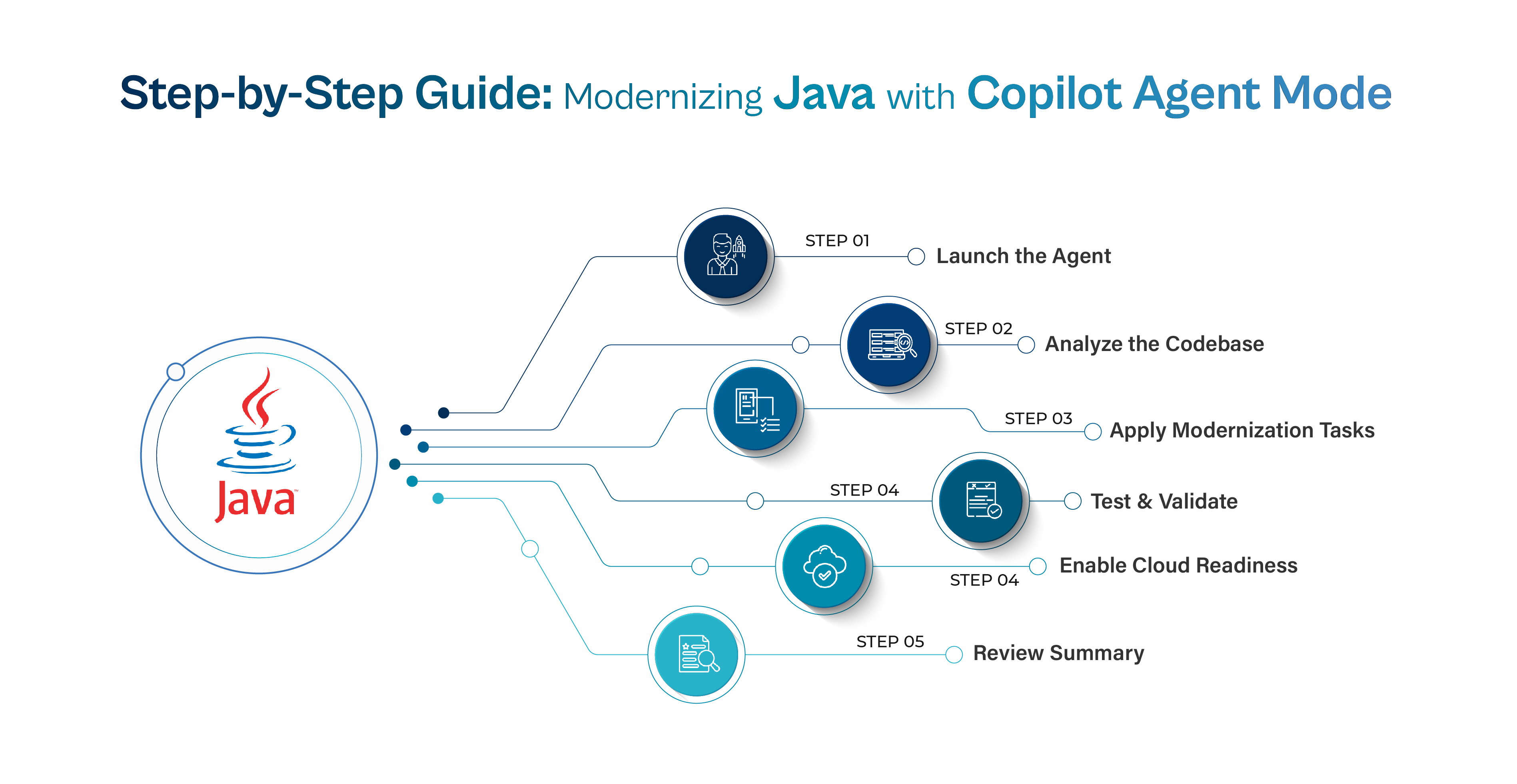
GitHub Copilot Agent Mode transforms this process. Acting as an AI powered modernization assistant, it automates code analysis, refactoring, and migration, bringing speed, safety, and precision to legacy upgrades.
Here’s how it works:
- Codebase Analysis- Copilot scans the entire Java project, identifies deprecated libraries, fragile dependencies, and compatibility issues with newer versions.
- Upgrade Path Recommendation- It maps out the modernization journey, highlighting framework upgrades, API replacements, and configuration changes required for newer Java versions.
- Automated Refactoring - Using natural language guidance, developers specify goals (e.g., “migrate to Java 17”), and Copilot executes the transformation, rewriting code, updating dependencies, and applying best practices.
- Testing and Validation - Copilot automatically runs tests, identifies errors, and validates functionality to ensure nothing breaks during migration.
- Deployment and Optimization - Once verified, the modernized project is ready for deployment, with optimized performance, improved maintainability, and long term scalability.
The Impact
GitHub Copilot Agent Mode cuts modernization cycles from weeks to hours, enabling teams to upgrade confidently and continuously. It doesn’t just modernize Java applications, it redefines how modernization happens, empowering developers to focus on innovation instead of maintenance.
Why Modernization Matters
Modernizing Java applications isn’t just about keeping up with the latest version, it’s about ensuring your systems stay fast, secure, and cloud ready in a digital first world. Many enterprises still run on older Java versions like 8 or 11. While these systems may function, they quietly accumulate technical debt that limits performance and innovation. Outdated frameworks slow scalability, deprecated APIs break on newer runtimes, and old dependencies open the door to security vulnerabilities.
Even more critically, legacy setups often struggle to integrate with modern DevOps pipelines, CI/CD tools, and cloud native environments, making it harder for teams to release updates quickly and reliably. Modernization is how organizations break free from this bottleneck. By upgrading Java applications, they unlock better performance, tighter security, and smoother compatibility with today’s cloud ecosystem.
With GitHub Copilot Agent Mode, this process becomes faster and safer. The AI assistant automates code reviews, dependency updates, and version migrations, while developers stay in control. The result? A modern codebase that’s cleaner, more resilient, and ready for the future.
What Is Copilot Agent Mode?
GitHub Copilot Agent Mode takes AI assisted development to the next level. Unlike traditional Copilot, which simply suggests code snippets, Agent Mode is goal driven, it understands your intent and carries out multi step tasks autonomously. Think of it as a hands-on modernization partner that doesn’t just assist with lines of code, but manages the entire upgrade process from start to finish.
For Java projects, Copilot Agent Mode can:
- Analyze your current frameworks, dependencies, and compatibility gaps.
- Propose a clear migration plan with step-by-step upgrade actions.
- Refactor code automatically, updating syntax and replacing deprecated APIs.
- Build and test iteratively until the modernization succeeds.
- Scan for security vulnerabilities in your dependencies.
- Prepare your project for the cloud, enabling containerization and CI/CD readiness.
In essence, Copilot Agent Mode works as a “project upgrade assistant” automating the repetitive, error prone parts of modernization while keeping developers firmly in control of decisions. It’s not replacing human judgment; it’s amplifying it, helping teams modernize Java applications faster, smarter, and more confidently.
Preparing Your Java Project for Copilot Agent Mode
Before you begin modernizing your Java project with GitHub Copilot Agent Mode, it’s important to set up the right environment. A clean, well prepared setup ensures that the AI can analyze, refactor, and validate your code efficiently.
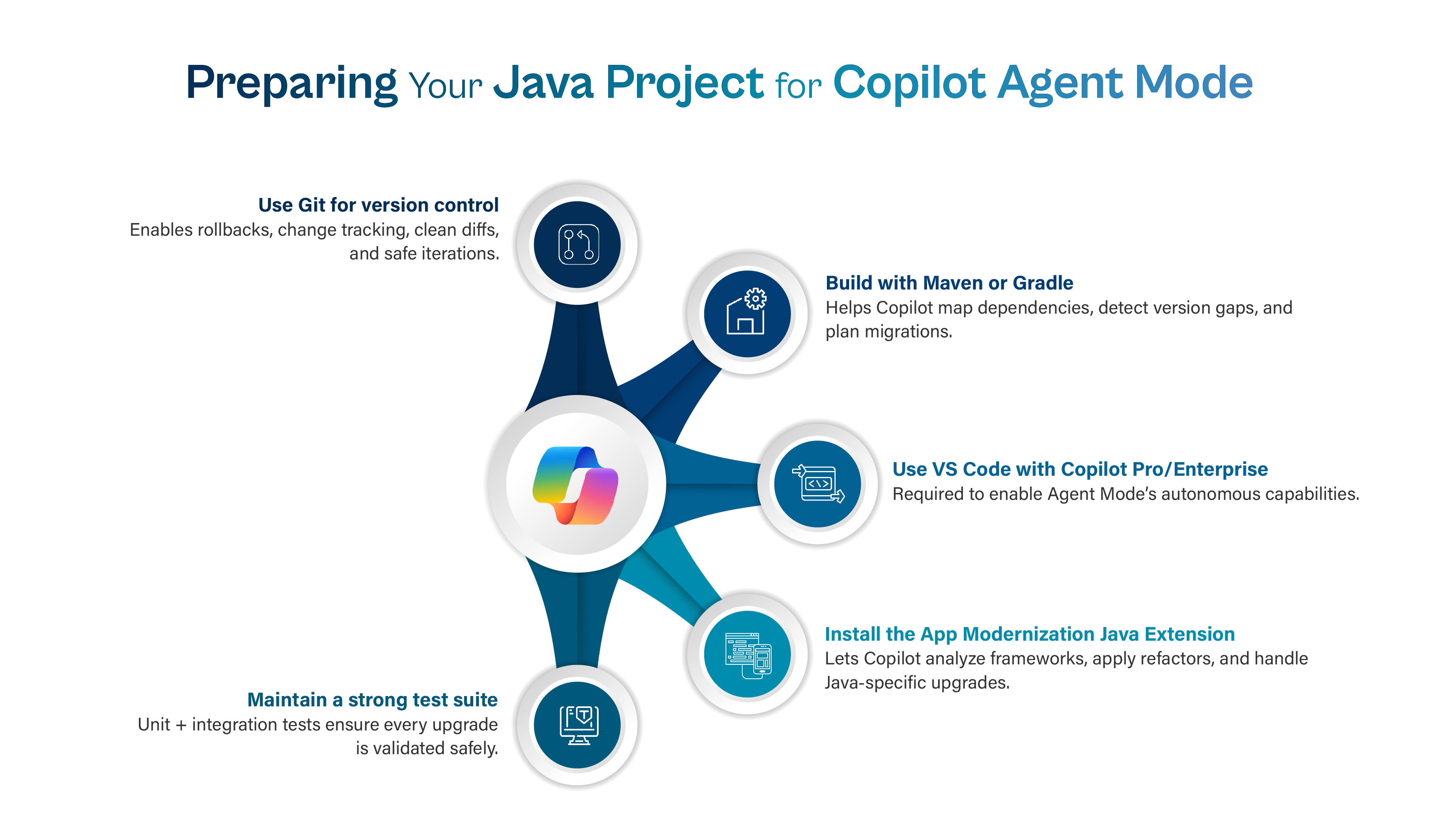
Here’s what you need to do before launching:
- Version Control Ready: Make sure your Java project is under Git for proper version tracking and rollback if needed. Copilot works best when it can understand your project history and context.
- Build System in Place: Your project should use Maven or Gradle builds, these help Copilot map dependencies, detect compatibility gaps, and streamline refactoring.
- Use Visual Studio Code with Copilot Pro or Enterprise: These versions unlock Agent Mode, allowing you to interact with the AI as a hands-on collaborator.
- Install the GitHub Copilot App Modernization Java Extension: This extension equips Copilot with the tools to analyze frameworks, apply migrations, and handle Java specific upgrades.
- Maintain a Functional Test Suite: A robust test suite ensures confidence in every upgrade step, validating that new builds run correctly and existing functionality remains intact.
Once everything is in place, open your project in Visual Studio Code and activate Agent Mode. From there, Copilot becomes your intelligent modernization assistant, ready to assess, refactor, and evolve your Java codebase safely and efficiently.
Modernizing Java Projects: A Step-by-Step Guide with Copilot Agent Mode
Modernizing a Java project with GitHub Copilot Agent Mode is designed to be structured, transparent, and collaborative.
Here’s how the process unfolds, step by step:
1. Launch the Agent
Start by opening Copilot Chat, switching to Agent Mode, and selecting App Modernization for Java.
Then, define your goal clearly for example:
“Upgrade this project from Java 8 to 21. Identify deprecated APIs, update dependencies, and ensure cloud readiness.”
Copilot interprets your intent, analyzes the project’s structure, and automatically drafts an upgrade plan tailored to your request.
2. Analyze the Codebase
Next, the agent scans your build files, dependencies, and source code to identify:
- Current JDK versions and frameworks
- Deprecated APIs and security vulnerabilities
- Version gaps or configuration issues
It then generates a detailed modernization roadmap outlining what will be updated, replaced, or refactored all subject to your review and approval.
3. Apply Modernization Tasks
Once you approve the plan, Copilot uses OpenRewrite, a large scale automated refactoring engine, to execute the upgrades.
It seamlessly:
- Updates imports, syntax, and dependency versions
- Replaces deprecated APIs
- Resolves build issues automatically
Throughout the process, you stay in control reviewing and validating changes as they’re applied.
4. Test and Validate
Copilot runs your unit and integration tests to confirm stability and ensure the upgraded project behaves as expected.
If any tests fail, it:
- Pinpoints the root cause
- Suggests targeted fixes
- Re runs validation for confirmation
Security scans also verify dependency integrity and compliance with modern standards.
5. Enable Cloud Readiness
Beyond modernization, the agent helps you prepare your app for cloud deployment by:
- Replacing hard coded variables with environment managed configurations
- Suggesting Dockerfiles or Kubernetes manifests
- Recommending cloud-native integrations (like logging, monitoring, or secret management)
This ensures your upgraded application is optimized for scalability and deployment flexibility.
6. Review the Summary
At the end of the process, Copilot provides a comprehensive summary report detailing:
- Files and dependencies updated
- Vulnerabilities fixed
- APIs replaced
- Test results and validation outcomes
This report doubles as documentation and an audit trail, giving you full visibility into every modernization step. With Copilot Agent Mode, modernization becomes faster, safer, and smarter turning complex legacy upgrades into a guided, collaborative workflow.
Benefits of Copilot Agent Mode
Modernizing legacy Java applications has always been a complex, time consuming process until now. GitHub Copilot Agent Mode transforms modernization from a tedious upgrade into a guided, intelligent workflow. Here’s how it delivers real value:
1. Saves Time
What once took weeks or even months can now be completed in a matter of hours. Copilot automates code analysis, refactoring, and testing, drastically accelerating upgrade cycles without sacrificing accuracy.
2. Minimizes Risk
Manual modernization is prone to human error, missed dependencies, broken builds, or incomplete updates. Copilot’s automated and validated approach reduces these risks, ensuring changes are consistent and reversible.
3. Ensures Quality
Every modernization step includes built in testing. Copilot runs unit and integration tests automatically, verifying that new code behaves exactly as expected and existing functionality remains intact.
4. Enhances Security
Outdated libraries and dependencies are one of the biggest security liabilities in legacy systems. Copilot scans for vulnerabilities, recommends safe replacements, and helps maintain compliance with modern security standards.
5. Enables Cloud Readiness
Copilot doesn’t just modernize your code, it prepares it for the future. By suggesting Dockerfiles, deployment manifests, and environment based configurations, it simplifies migration to Azure, AWS, or Kubernetes, helping teams embrace cloud native development effortlessly.
In short, GitHub Copilot Agent Mode empowers developers to modernize faster, safer, and smarter bridging the gap between legacy code and the future of intelligent, cloud ready software.
Best Practices for Using Copilot Agent Mode
To get the most out of GitHub Copilot Agent Mode, it’s essential to balance automation with thoughtful oversight. These best practices help ensure your modernization journey is smooth, secure, and sustainable:
1. Start Small with a Pilot Project
Begin with a smaller, non critical application to understand how Agent Mode works in your environment. This lets you refine workflows, identify challenges, and build internal confidence before scaling to larger projects.
2. Use Version Control for Safe Rollbacks
Always keep your project under Git version control. Each modernization step should be committed separately, allowing you to track changes, compare outcomes, and safely roll back if needed.
3. Maintain Strong Test Coverage
A robust unit and integration test suite is key to validating that your modernized code works as intended. Copilot can run tests automatically, but having comprehensive coverage ensures nothing breaks silently during upgrades.
4. Review Critical Logic Manually
Even with automation, human oversight remains essential. Review business-critical sections of code such as financial logic, authentication, or API integrations, to ensure updates preserve functionality and intent.
5. Keep Copilot Reports for Documentation and Compliance
Copilot automatically generates detailed summary reports of all changes made, vulnerabilities fixed, and dependencies updated. Store these as part of your documentation for auditability, compliance, and future reference.
Following these best practices ensures you harness Copilot Agent Mode’s full potential, combining the efficiency of AI driven automation with the precision of human expertise.
Conclusion - From Experimentation to Enterprise Transformation
The journey from pilot to payoff in Generative AI and intelligent modernization isn’t about chasing trends, it’s about building sustainable value. As organizations embrace tools like GitHub Copilot Agent Mode, they move beyond experimentation toward true transformation, where AI becomes an embedded partner in the development lifecycle, not just an assistant.
By aligning AI initiatives with business outcomes, modernizing legacy systems, and nurturing a culture of continuous learning and governance, enterprises can unlock a new era of software innovation, faster, safer, and more resilient than ever before.
Modernization is no longer a back office task; it’s a strategic enabler. Copilot Agent Mode demonstrates how AI can turn once complex, error prone upgrades into guided, auditable, and high velocity transformations. When combined with human expertise and ethical oversight, it redefines what’s possible, helping teams focus less on maintenance and more on meaningful creation.
In the end, the true payoff of AI isn’t measured in lines of code modernized or hours saved, it’s in the agility, confidence, and innovation it brings to people and organizations ready to evolve. The future belongs to those who don’t just adopt AI, but work alongside it, building systems, teams, and cultures that are as intelligent as the technology they use.
Ready to transform your development process with AI?
Discover how GitHub Copilot Agent Mode can revolutionize your Java modernization journey, turning time-consuming upgrades into fast, secure, and scalable transformations.
Get started today and see how AI-driven innovation can unlock the full potential of your legacy systems.


.png)