
An AI agent can work perfectly in a demo and still be unready for production.
A prototype usually proves that a model can answer questions, retrieve information, use tools, or complete a workflow. Production demands much more. The system must work with real users, real data, unpredictable inputs, security threats, system failures, and real operating costs.
The gap between experimentation and production is significant. Gartner's 2024 AI Mandates for the Enterprise Survey found that, on average, only 41% of generative AI prototypes reached production. The finding highlights a fundamental challenge: proving that an AI concept works is very different from building a system that an organization can reliably operate at scale.
That is why moving from prototype to production LLM is less about deploying existing code and more about engineering the system around the model. Teams need measurable quality standards, controlled access, reliable failure handling, observability, cost management, and a safe rollout strategy.
This 10-step AI agent production deployment checklist provides a practical path from working prototype to production in six weeks.
TL;DR: What It Takes to Move an AI Agent Into Production
- Define measurable requirements before making the prototype bigger.
- Audit the existing system and fix production gaps instead of automatically rebuilding everything.
- Treat security, evaluation, reliability, and observability as core parts of the application.
- Measure cost and performance under realistic workloads before expanding usage.
- Launch gradually, establish ownership, and continuously evaluate the agent after deployment.
From “It Works” to “We Can Run It”
The fundamental difference between a prototype and a production system is reliability.
A prototype asks, “Can this idea work?” Production asks, “Can we trust this system to keep working when conditions change?”
A six-week launch plan can help teams move through these requirements systematically without treating deployment as a last-minute task.
Step 1: Define What Production-Ready Means
Before changing the architecture, define what success looks like.
Start with the business outcome. What should the agent accomplish? Who will use it? Which tasks should it handle, and when should it stop and involve a person?
Then establish measurable targets for response quality, task completion, latency, availability, cost, and escalation.
For example, “the agent should provide accurate answers” is difficult to test. A stronger requirement identifies the approved information sources, the acceptable quality threshold, and situations where the agent must escalate rather than answer.
These requirements become the production scorecard.
Deliverable: An agreed definition of production readiness.
Step 2: Audit the Prototype
Do not assume the prototype needs to be rebuilt from scratch.
Review how the current system works, including the model, prompts, tools, APIs, retrieval process, data sources, authentication, state management, logging, and error handling.
Look for shortcuts that were acceptable during experimentation but could become liabilities in production. Hard-coded credentials, temporary infrastructure, manual processes, undocumented dependencies, and broad tool permissions are common examples.
Classify each component as something to keep, harden, or replace.
This gives the team a realistic picture of how much work remains instead of creating an unnecessary rebuild project.
Deliverable: A prioritized list of technical debt, risks, and production gaps.
Step 3: Finalize the Agent Architecture
With the gaps identified, make the production architecture explicit.
Decide how models, tools, retrieval, memory, application logic, and enterprise systems will interact. Establish where state lives and which components are responsible for authentication, data access, and business rules.
This is also the right time to decide whether the workflow actually needs an autonomous agent.
If a process follows a predictable sequence, conventional application logic may be easier to test and control. An agent makes more sense when the system needs to interpret context, select tools, or determine the next step dynamically.
For complex workflows, teams may use patterns such as ReAct or Plan-and-Execute. The architecture should follow the problem rather than the other way around.
Deliverable: A documented production architecture with clear component boundaries.
Step 4: Build Security Into the Agent
Security cannot be added after the agent is already connected to enterprise systems.
An agent that can access customer information, internal documents, or business applications needs clearly defined boundaries around what it can see and what it can do.
For example, an agent might need to retrieve a customer's account information but have no reason to change that account. The application should enforce that distinction rather than relying on the model to follow an instruction in its prompt.
The same principle applies to sensitive information. Credentials should not be placed in prompts or application code, and users should only receive information they are authorized to access. Data should be handled according to its sensitivity, with additional controls where personal or confidential information is involved.
Teams also need to test malicious inputs designed to manipulate the agent. Prompt injection can attempt to override intended instructions, expose sensitive information, or persuade an agent to misuse a connected tool. OWASP identifies prompt injection and excessive agency among important risks for LLM applications.
Security should therefore be enforced across the application, data, tools, and infrastructure, not delegated to the model itself.
Deliverable: Tested security boundaries for data access and agent actions.
Step 5: Build an Evaluation Suite
A few successful demo conversations are not an evaluation strategy.
LLM applications can fail in different ways. The model may provide an incorrect answer, retrieve the wrong information, select an inappropriate tool, or complete only part of a task.
The need for structured evaluation is reinforced by the level of trust developers place in AI-generated output. DORA's research found that 39% of developers outside Google trust the quality of generative AI output only “a little” or “not at all.” That makes repeatable evaluation especially important when an agent is expected to make decisions or complete tasks without constant human review.
Build a representative evaluation set that includes normal requests as well as ambiguous questions, edge cases, adversarial inputs, out-of-scope requests, and tool or retrieval failures.
Measure the outcomes that matter to the business. Depending on the application, that could include task completion, factual accuracy, groundedness, correct tool selection, escalation behavior, latency, and cost.
Evaluation should continue after launch. A production failure is valuable test data when it is added back into the evaluation set.
Deliverable: A repeatable evaluation suite with clear quality thresholds.
Step 6: Design for Failure
Production systems will encounter failures. APIs will time out, external services will become unavailable, and tools will sometimes return unexpected results.
The important question is how the agent responds.
Temporary failures may require controlled retries. A failed external service may require a fallback or escalation. Multi-step workflows need a way to recover from partial completion without blindly repeating actions that have already succeeded.
Operations that could create duplicate or irreversible changes should be designed carefully so that retrying does not accidentally perform the same action twice.
Most importantly, the agent should never report that an action succeeded when the underlying system did not confirm it.
A safe failure is preferable to a confident but incorrect continuation.
Deliverable: Tested recovery paths for realistic failure scenarios.
Step 7: Add Observability Before Launch
When an agent makes a mistake, the final answer rarely explains why.
Engineers need visibility into the execution that produced it. That means being able to trace model calls, tool usage, retrieved information, latency, errors, retries, token consumption, cost, and the final outcome.
For multi-step agents, this becomes particularly important. A poor final response may actually originate from a retrieval problem or an incorrect tool decision several steps earlier.
Good observability should allow the team to answer practical questions: What happened? Which component failed? How many model calls were made? Why did the request become expensive? Where did latency increase?
Logging should also be designed with privacy in mind. Capturing unnecessary sensitive information creates another security risk.
Deliverable: Production monitoring and traceability across agent workflows.
Step 8: Control Cost and Performance
A prototype can make inefficient model calls without anyone noticing. Production traffic changes that quickly.
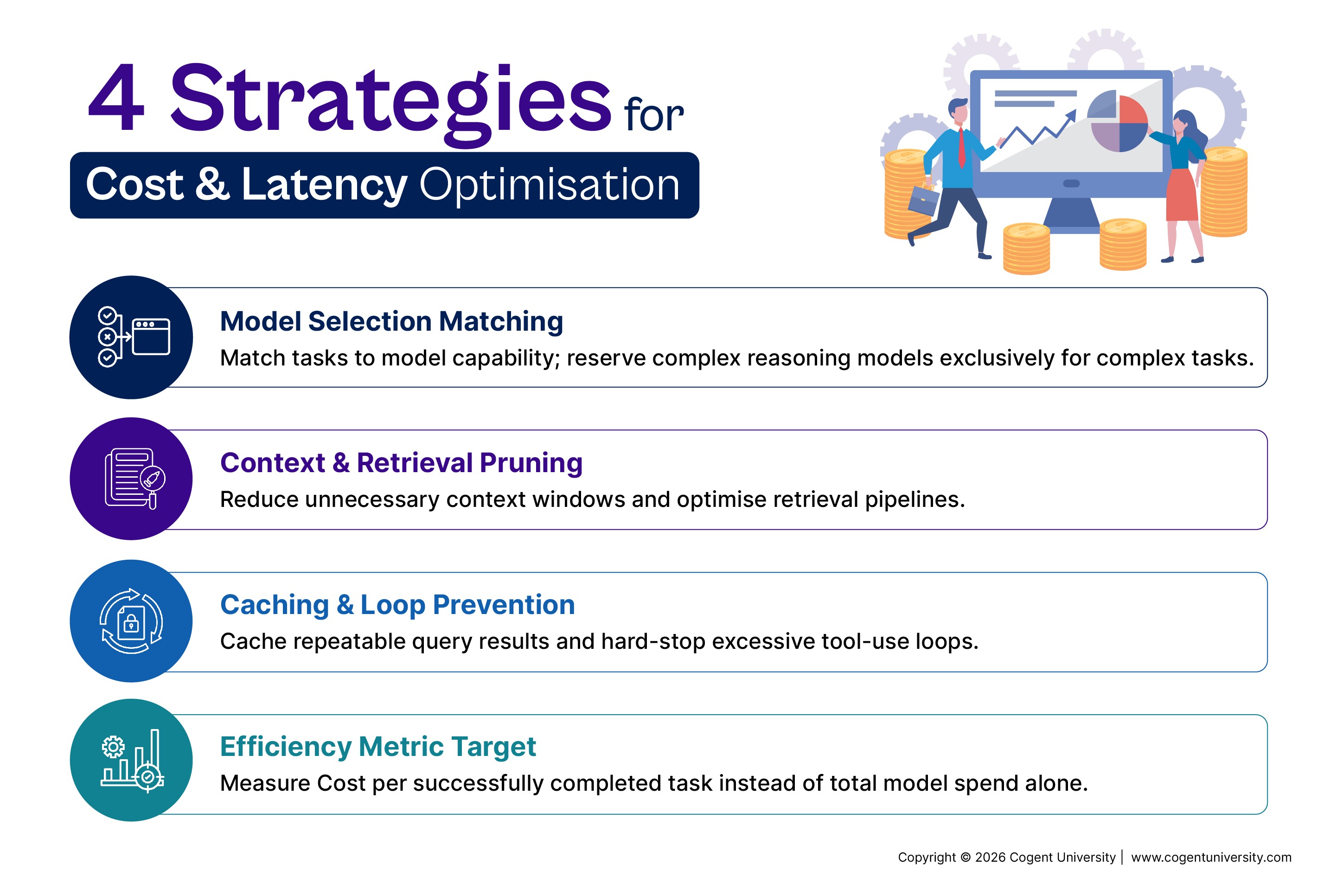
Measure how many model calls are needed to complete a task, how much context is being processed, how often tools are called, and how long the workflow takes.
Model selection should balance capability, latency, and cost. Simpler tasks may not require the same model used for complex reasoning.
Teams can also improve efficiency by reducing unnecessary context, optimizing retrieval, caching repeatable results, and preventing excessive tool-use loops.
One useful metric is cost per successfully completed task. It provides more insight than looking only at total model spending.
Deliverable: A validated baseline for cost, latency, and throughput.
Step 9: Roll Out Gradually
Going from internal testing to full production traffic in one step creates unnecessary risk.
Start with internal users and realistic workflows. Where appropriate, run the agent in shadow mode so it can process real scenarios without taking consequential actions.
Next, release it to a limited percentage of users or traffic. Monitor quality, failures, latency, security events, and cost before expanding access.
Feature flags, rate limits, and rollback procedures make the launch easier to control. For high-impact workflows, human approval can provide another layer of protection.
The team should agree in advance on what would stop the rollout. That might include unacceptable quality, unexpected costs, security issues, or failure rates above the defined threshold.
Deliverable: A controlled and reversible launch plan.
Step 10: Establish Ownership After Launch
Production is the beginning of ongoing operation, not the end of development.
Someone needs responsibility for model changes, prompts, tools, evaluation data, security reviews, incidents, costs, and user feedback.
Version-control important configuration wherever possible. A change to a prompt, model, retrieval configuration, or tool can alter the agent's behavior even when the application code itself has not changed.
The operating cycle should be continuous:
Monitor → Evaluate → Fix → Test → Deploy → Monitor
This turns production data into an improvement mechanism instead of allowing failures to remain isolated incidents.
Deliverable: Clear ownership and a continuous improvement process.
The 6-Week AI Launch Playbook
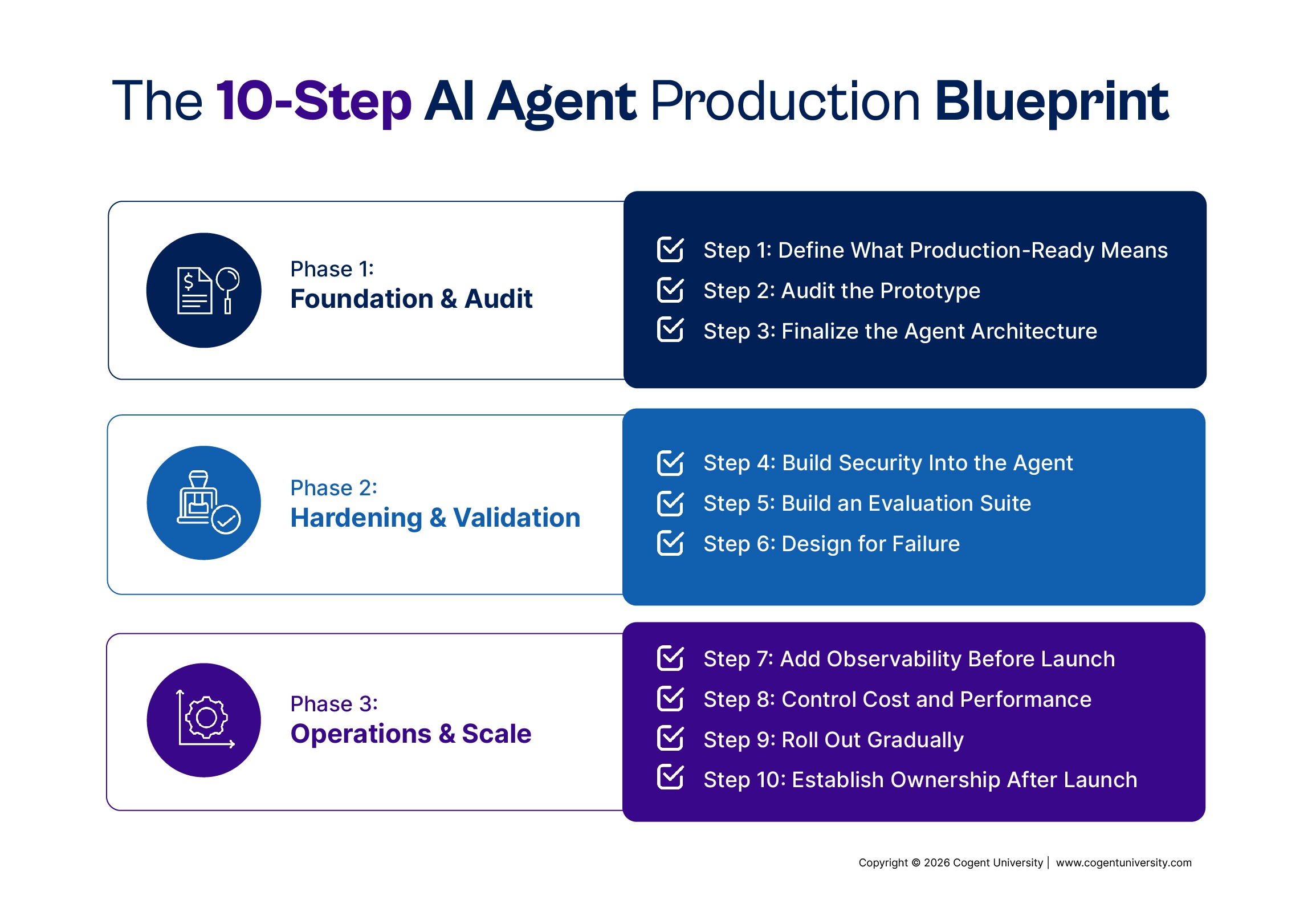
The 10 steps can be organized into a practical six-week plan:
Six weeks is a planning framework, not a universal deadline. Applications involving sensitive information, regulated industries, or high-impact decisions may need additional testing and review.
Final Production-Readiness Checklist
Before launch, confirm that the team has:
- Defined measurable production requirements
- Audited the prototype
- Documented the architecture
- Tested security and access boundaries
- Established repeatable evaluations
- Tested failure recovery
- Implemented observability
- Validated cost and performance
- Created rollback procedures
- Assigned post-launch ownership
Conclusion
Moving an AI agent from a demo to production is not about making the prototype bigger. It is about making the entire system dependable.
A prototype proves that an idea can work. Production engineering determines whether it can keep working when real users, unpredictable inputs, sensitive data, failures, and operating costs enter the picture.
The process is straightforward: define the target, audit the prototype, finalize the architecture, secure it, evaluate it, prepare for failure, add observability, control costs, roll it out gradually, and establish ownership.
A six-week AI launch playbook gives teams a practical structure for moving quickly without skipping the engineering work required for a production-ready system.
The goal is not simply to deploy an AI agent. The goal is to deploy one that the team can measure, control, troubleshoot, and improve.
Ready to take your AI agents beyond the prototype?
Cogent University’s Agentic AI: Design, Deploy & Monitor AI Agents helps you build the practical skills needed to create AI agents that can work in real-world environments.
Because learning the concepts is only the beginning. A course is not enough.
FAQs
How long does it take to move an AI agent from prototype to production?
It depends on the application's complexity and risk. A focused agent can potentially follow a six-week launch plan, while systems involving sensitive data or extensive integrations may require substantially more time.
What is the hardest part of moving an LLM prototype to production?
The challenge is usually making the complete system reliable, rather than simply getting the model to generate a good response. Security, evaluation, failure recovery, observability, and cost all become important.
How should an AI agent be evaluated before launch?
Use representative scenarios covering normal requests, edge cases, ambiguous inputs, adversarial prompts, and failures. Measure outcomes such as task completion, accuracy, tool use, safety, latency, and cost.
Does every workflow need an autonomous agent?
No. Predictable workflows may be better handled through conventional application logic. Agents are most useful when the system needs to interpret context and make dynamic decisions about how to complete a task.


.png)