

TL;DR: Key Takeaways
- A notebook can prove that an AI agent works. It cannot prove that the agent is ready to serve real users.
- The biggest problems usually appear outside the model: state management, tool failures, security, monitoring, testing, and cost.
- An agent that can take action needs tighter controls than one that only generates text.
- Moving an agent to production means building the systems around it so that it can handle failures, unexpected inputs, and real workloads.
- The goal is not simply to deploy the agent. It is to make it dependable enough to run as a service.
Your Notebook Is a Prototype, Not a Production Service
.jpg)
Your notebook code works. You tested the agent, fed it a few clean prompts, watched it orchestrate tools effortlessly, and got the output you wanted.
Then you shipped it to users, and everything started breaking.
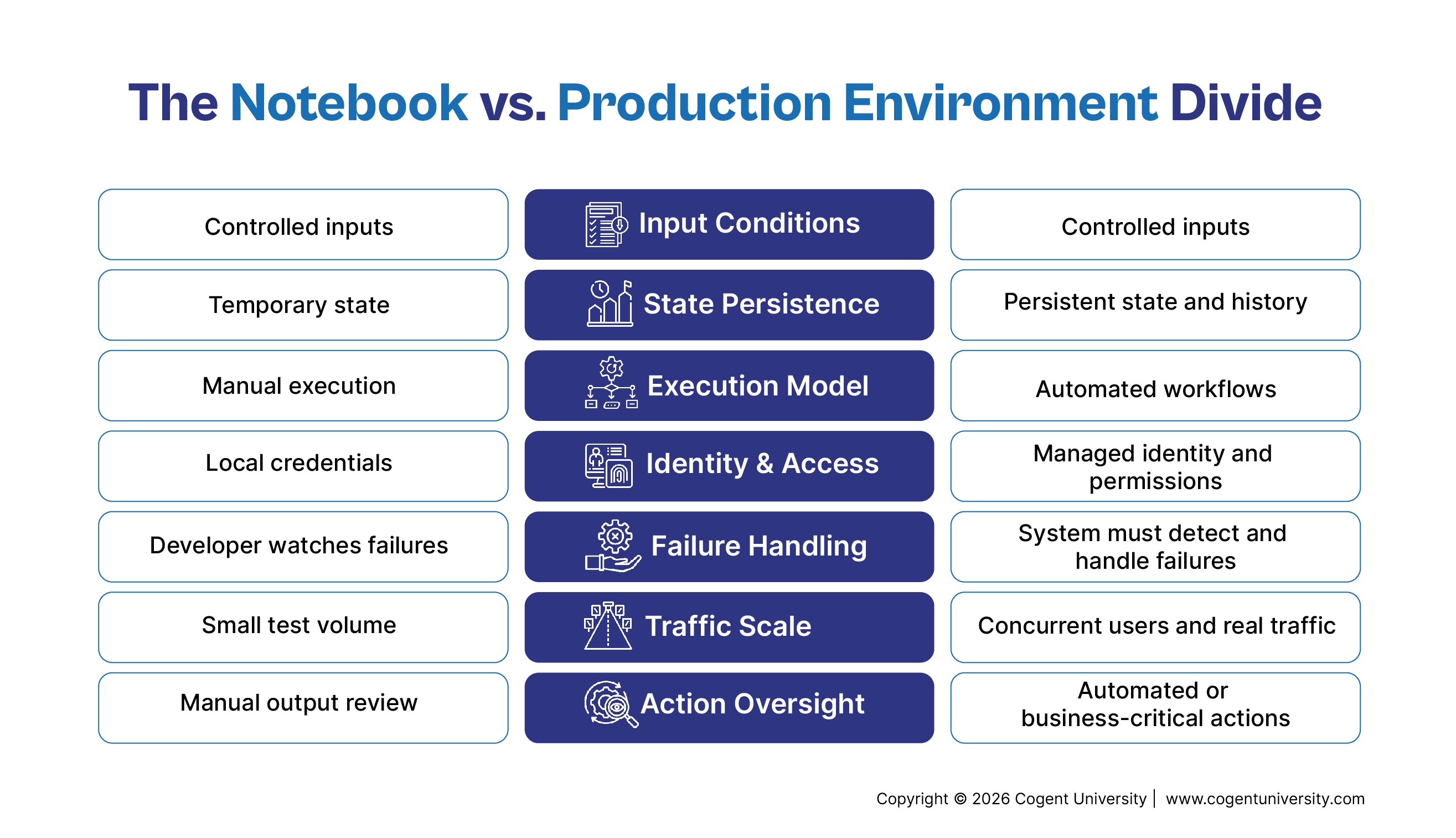
The model isn't broken. The problem is that notebooks are a luxury resort. You control the inputs, credentials, database state, and network. If something fails, you just hit Shift+Enter and run it again.
Production, on the other hand, is the wild. Real users throw curveball inputs, APIs time out, concurrent requests collide, and models suddenly decide to take a completely unscripted detour. If your agent has write permissions or triggers actions, a single hallucination or bad tool call stops being a funny bug and becomes a business emergency.
Bridging the notebook-to-production gap isn't about fine-tuning a better prompt. It’s about building the engineering scaffolding around the model so it can survive reality:
- Treat inputs like hostile territory: Real users won't follow your prompt structure. Build robust validation layers to catch ambiguous, messy, or malicious payloads before they ever hit the LLM.
- Expect infrastructure to betray you: APIs drop, databases lock, and rate limits hit. Wrap your tool calls in aggressive retries, timeouts, and fallback states so a single dropped connection doesn't tank the user session.
- Put guardrails on autonomy: Never give an agent unvetted write access. Use deterministic schemas, permission boundaries, and mandatory human-in-the-loop checkpoints for any high-stakes action.
- Instrument everything: Non-deterministic systems are nightmares to debug. Log every thought, tool input, and payload so you can retrace why the model made a specific call when things go sideways.
Getting an AI agent to work once in a sandbox is a weekend project. Building the safety net that lets it run reliably at scale? That’s where the actual software engineering begins.
Where the Notebook-to-Production Gap Comes From
In a notebook, the workflow often looks simple:
User request → model → tool → result
In production, the same workflow becomes:
User request → authentication → application → agent → model → tool → external system → validation → response → monitoring
Every additional connection introduces another place where something can fail.
This is why an agent that performs well during development can behave very differently once it becomes a service.
An AI Agent Is Not Just Another API
A traditional API usually follows a defined path. The application receives a request, runs specific logic, and returns a response.
An agent has more freedom. It can interpret a goal, decide what information it needs, choose a tool, examine the result, and decide what to do next.
That flexibility is useful, but it creates another engineering problem: the system cannot assume that the agent will always take the same path.
Consider a customer service agent that can check an order, change a shipping address, and issue a refund. A user might simply ask, “Where is my order?” The agent may only need to look up the order and respond.
But another request, “The package never arrived. Refund me,” could require several steps. The agent has to identify the customer, retrieve the order, check its status, determine whether the request meets the refund policy, and potentially initiate a transaction.
The challenge is reflected in production data. Gartner found that only 41% of generative AI prototypes reach production. Meanwhile, an IBM Research study of 306 practitioners found that 68% of production agents execute 10 steps or fewer before human intervention, with reliability identified as the top development challenge.
The model is only one part of that workflow. The production system has to control what happens around it.
Build the Production Architecture Around the Agent
A production agent should be treated as a service, not as a notebook with an API endpoint attached to it.
The agent runtime needs to sit within an architecture that handles identity, data, tools, state, monitoring, security, and failure recovery.
One important design decision is deciding what the model can recommend versus what the application can execute.
For example, an agent can determine that a customer appears eligible for a refund. That does not mean the model should have unrestricted access to the payment system.
The application can check the refund amount, verify permissions, apply business rules, and then execute the transaction through a controlled service.
This separation reduces the damage a bad model decision can cause.
It also makes the system easier to test and maintain. Business rules should not disappear into a prompt simply because the agent happens to handle that part of the workflow today.
State Management: Bridging the Request Gap
While not all agents require long-term retention, operating in production demands robust state handling. Effective agents must maintain conversation histories, track workflow progress, store tool outputs, and record completed operations.
Notebook environments retain state in memory effortlessly, but production systems necessitate structured strategy for persistence and retrieval.
System recovery is equally vital. Consider an agent generating a purchase order: if an API call times out, it remains uncertain whether the request failed or completed without returning a response. Blindly retrying risks duplicating the transaction.
This highlights the necessity of idempotency, ensuring operations can be safely re-executed without duplicating business outcomes.
These challenges stem from application engineering rather than model architecture, and addressing them is essential for real-world deployment.
Tools Can Turn a Model Mistake Into a Business Problem
An agent that only writes text can give someone a bad answer.
An agent connected to business systems can do much more damage.
Every tool should therefore have a clear purpose and a defined boundary. Inputs should be validated, permissions should be limited, and failures should have a predictable response.
If an HR agent needs to retrieve benefits information, it probably does not need permission to modify payroll records.
If a sales agent can create a CRM opportunity, it may not need permission to delete customer records.
The principle is simple: give the agent access to what it needs, not everything it could possibly use.
Timeouts and retries also need to be designed rather than left to chance. If a tool is unavailable, the agent should know when to stop, when to retry, and when to tell the user that the task could not be completed.
Security Changes When the Agent Can Act
As an agent gains access to enterprise data and operational capabilities, security demands escalate significantly.
Prompt injection represents a primary threat vector, where malicious input embedded in user queries, documents, or web pages attempts to hijack the system's behavior. OWASP highlights prompt injection alongside excessive agency as critical vulnerabilities in generative AI systems.
Excessive agency poses particular hazards for production deployments. Provisioning an agent with redundant or overly broad tool permissions expands its potential failure surface.
To mitigate these risks, implement a defense-in-depth architecture featuring least-privilege permissions, robust authentication, secure credential storage, strict input and output validation, and explicit policy controls.
Establishing human-in-the-loop checkpoints for critical operations provides essential oversight. For instance, a customer service agent might autonomously approve a $20 credit adjustment but escalate a $2,000 refund request for manual review. While specific operational thresholds vary by organization, the core rule remains: autonomy should be calibrated to the risk level of the action.
Finally, a comprehensive security strategy must encompass every component, including memory stores, connected data sources, integrated tools, and downstream systems, rather than focusing solely on model protection.
You Need to See What the Agent Did
With a normal application, an error log might be enough to start investigating a failed request.
With an agent, you need more context.
If the agent gives a customer the wrong answer, you may need to know which model was used, what instructions it received, what information it retrieved, which tools it called, what those tools returned, and where the workflow went off track.
That is what observability provides.
A useful production setup should let engineers trace an interaction across the agent, model calls, tools, databases, and other services. It should also provide visibility into latency, failures, usage, and cost.
There is a balance here. Logging everything can create its own security and privacy problems, particularly when conversations contain sensitive information. Production telemetry therefore needs access controls and sensible retention policies.
The point is not to collect endless logs. It is to collect enough information to answer a basic question when something goes wrong:
What did the agent do, and why?
“It Worked” Is Not a Production Test
Relying on overly predictable scenarios can cause an agent to pass all initial tests yet fail under actual production conditions.
Effective testing must account for edge cases and unexpected behavior:
- Incomplete or repeated user requests
- Unexpected inputs and incorrect data
- Unavailable tools and extended conversations
- Scenarios requiring the agent to halt rather than proceed
Evaluating a customer-support agent requires looking beyond the surface quality of its response. Validation must confirm whether the agent:
- Retrieved accurate context
- Adhered to established policies
- Invoked the correct tools
- Refrained from unauthorized operations
Because prompts, models, tools, data, and business rules constantly evolve, evaluation cannot end at launch. Deploying a production agent demands continuous monitoring and assessment to detect regressions before they reach end users.
Scaling and Cost Considerations
Workflows that incur negligible expenses in development can rapidly escalate in cost at production scale.
Because agents often invoke multiple model calls, retrieve extensive context, execute various tools, or rerun workflow steps, teams must gain clear visibility into financial impact before scaling.
Latency is equally critical.
When an agent relies on multiple external services, user experience can degrade significantly, even if the underlying model responds promptly, due to downstream API rate limits and throughput constraints.
Consequently, effective production planning must evaluate concurrency, latency, rate limits, model calls, and overall costs alongside response quality.
A Practical Path From Notebook to Production
Moving from a notebook to production does not mean throwing away the prototype. It means gradually turning the prototype into a service.
1. Define what success means.
Decide exactly what the agent should do, what it should never do, and which outcomes matter to the business. A clear scope makes every later decision easier.
2. Move the logic out of the notebook.
Put prompts, application logic, configuration, dependencies, and tool definitions into version-controlled components. Keep the notebook for experimentation rather than making it the production runtime.
3. Put boundaries around every tool.
Define what each tool can access, what inputs it accepts, what permissions it requires, and what happens when it fails.
4. Design state and recovery.
Decide what information needs to persist and how interrupted workflows will resume. Make important operations safe to retry.
5. Add security controls.
Use managed identities, least-privilege permissions, protected secrets, input validation, and approval workflows for sensitive actions.
6. Test and observe before scaling.
Build realistic evaluation cases and add tracing before the agent reaches a large user base. You should be able to understand both successful and failed workflows.
7. Roll it out gradually.
Start with a limited audience or lower-risk workflow. Watch performance, cost, failures, and user feedback before expanding the agent's responsibilities.
Conclusion
Getting an AI agent to work in a notebook is an important first step. It is just not the same thing as building a production service.
The difficult part starts when the agent has to deal with real users, real data, real systems, and real consequences.
That is why production readiness is less about the model and more about the engineering around it. The state needs to be managed. Tools need boundaries. Security needs to be enforced. Failures need to be recoverable. Agent behavior needs to be visible and tested.
The question is not simply, “Does the agent work?”
It is whether the agent can keep working when things do not go as planned.
That is what turns a promising notebook experiment into a production-ready AI service.
Explore Agentic AI with Cogent University
Ready to move beyond experimenting with AI agents? Cogent University’s Agentic AI: Design, Deploy & Monitor AI Agents helps you develop the skills to build AI agents for real-world applications.
Take your Agentic AI knowledge from theory to production.
A course is not enough.
FAQs
Why does an AI agent work in a notebook but fail in production?
Because the notebook provides a controlled environment. Production introduces real users, unpredictable inputs, external system failures, security requirements, persistent state, and higher workloads.
Do I need to rebuild the agent?
Usually not. The model and core workflow can often remain. The larger effort is hardening the surrounding application, tools, state management, security, testing, and monitoring.
Should every agent require human approval?
No. Approval makes sense for actions where a mistake could have significant consequences. Lower-risk tasks can often run automatically with appropriate controls.
What should I monitor after launch?
Look beyond uptime. Track workflow success, tool failures, latency, model usage, cost, security events, and whether the agent is producing the outcomes the business actually expects.


.png)